Tutorial 04
Proxy modes
Global Routing on Home decides whether rules apply. If you can connect but everything is slow, or traffic that should stay direct also goes through a node, the mode is usually wrong—not the app.
1. The mode control is the second row on Home
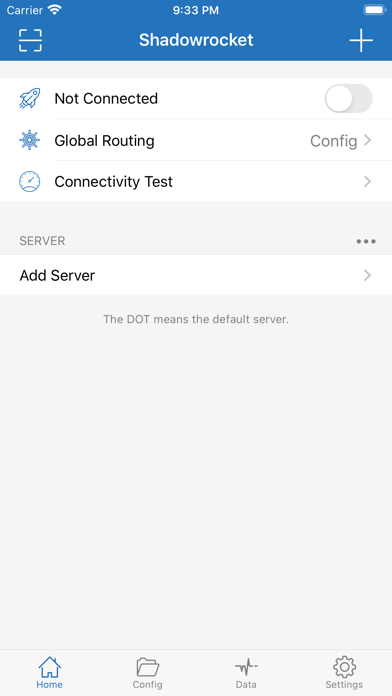
Tap Global Routing to see the three paths: Config, Proxy, and Direct.
| Label | Behavior | Use when |
|---|---|---|
| Config | The current rule file decides node vs direct | Daily use |
| Proxy | All traffic goes through the current node | Check whether rules blocked a request wrongly |
| Direct | No traffic goes through a proxy | Confirm the fault is not the node itself |
After you change it, return to Home and check that the right side of the second row shows what you picked. Do not start testing while you are still on Direct.
2. Which rule file Config depends on
Rule files in the Config tab take part in routing only when the mode is Config. Proxy and Direct ignore those “who handles this” decisions.
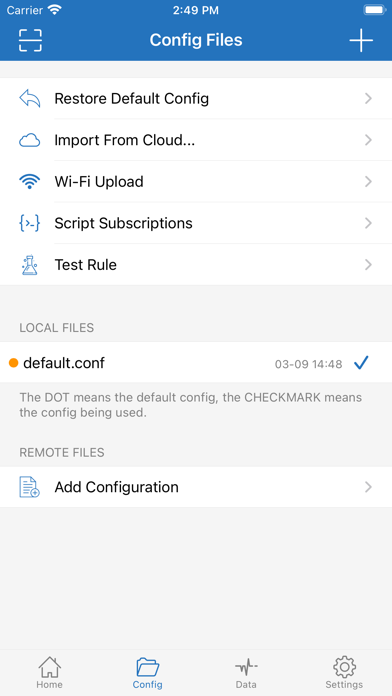
- Open Config at the bottom.
- In LOCAL FILES, tap the file you want. The check mark moves with it.
- Add a remote rule with REMOTE FILES → Add Configuration, save, then select it.
- Restore Default Config returns the bundled default file. Use it after rules have been edited into a mess.
3. What is inside a rule file
Opening default.conf shows category counts. This is not a node list. Do not look for server addresses here.
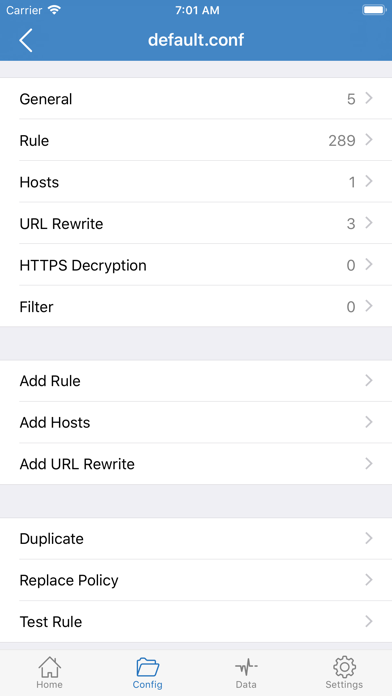
- General: general options for this config.
- Rule: domain, IP, and similar matches that choose PROXY / DIRECT and other policies.
- Hosts: local hostname mappings.
- URL Rewrite: rewrite URLs. This is an advanced item.
- HTTPS Decryption / Filter: decryption and filtering, often 0 by default. Know the certificate and privacy impact before you turn it on.
- Add Rule and Test Rule below add a rule or test a URL against the matchers.
4. How to choose
- Day to day, use Config so rules keep local traffic local.
- If a site fails under Config, switch to Proxy temporarily. If it opens then, the rules probably sent it direct or blocked it wrongly.
- If every node fails, switch to Direct. If access works under Direct, the problem is the node or subscription, not the system network.
- Do not leave Proxy on. Sending everything through a node uses more power and can also send local work out.